> ## Documentation Index
> Fetch the complete documentation index at: https://help.pixwel.com/llms.txt
> Use this file to discover all available pages before exploring further.
# Groups
> The Admin Dashboard Groups tab — the groups that define a user's role, the studios they cover, and how billing is configured.
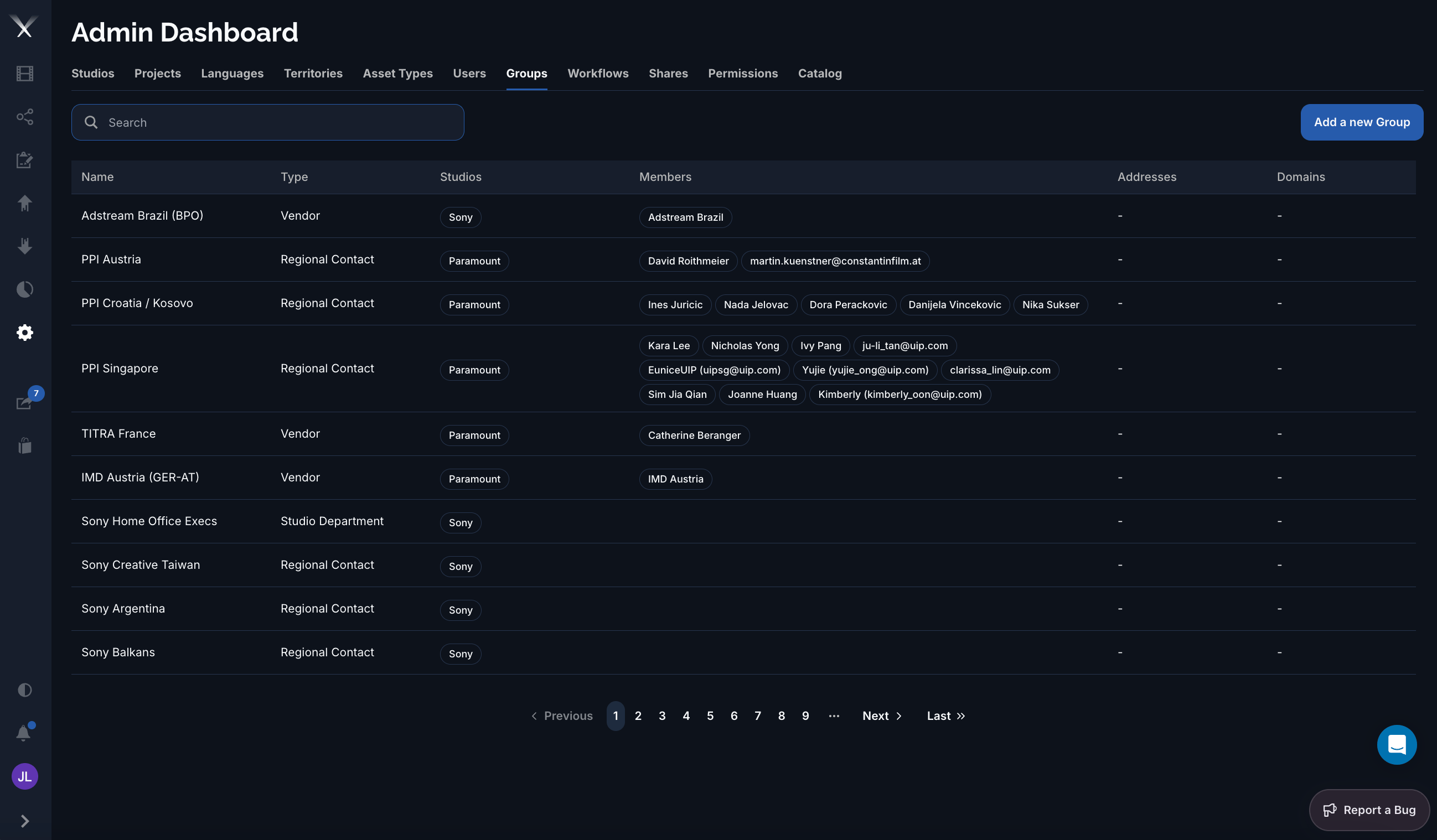
A [**group**](/glossary) is a set of users with a **type** and a set of [permissions](/features/admin/permissions); it defines a user's role on the platform. The **Groups** tab on the [Admin Dashboard](/features/admin-dashboard) is where groups are created and configured. For how group types map to what people can do, see [User roles](/features/user-roles).
 ## Columns
| Column | What it is |
| ------------- | ----------------------------------------------------------------------------------- |
| **Name** | The group's name. |
| **Type** | The group type — Admin, Studio Department, Regional Contact, or Vendor (see below). |
| **Studios** | The [studios](/features/admin/studios) the group covers, shown as tags. |
| **Members** | The [users](/features/admin/users) in the group. |
| **Addresses** | The group's mailing addresses. |
| **Domains** | Email domains used to auto-assign new users to the group. |
## Group types
| Type | Role |
| --------------------- | ----------------------------------------------------------------------------------------------------------------------------------------- |
| **Admin** | Full platform access, including the Admin Dashboard. |
| **Studio Department** | Belongs to one studio; typical studio-side access (sharing, download, orders, notes). |
| **Regional Contact** | Scoped to a studio, project, and territory with more limited access. Commonly called a **territory**. |
| **Vendor** | A localization partner spanning the studios/projects/territories they work on — see [Localization vendors](/guides/localization-vendors). |
## Editing a group
The group form is organized into tabs:
* **General** — **Name**, **Type**, the **Studios** the group covers, its **Members**, and any **Domains** for auto-assignment.
* **Addresses** — one or more mailing addresses (name, address, city, state, postal code, country).
* **Billing** — billing rates per work section (graphics, narration, scripts, dubbing), as length-based or flat rates.
Group **type** sets a sensible default set of capabilities, but the actual access is governed by the [Permissions](/features/admin/permissions) tab, where grants are scoped by studio, project, territory, language, and usage.
## Columns
| Column | What it is |
| ------------- | ----------------------------------------------------------------------------------- |
| **Name** | The group's name. |
| **Type** | The group type — Admin, Studio Department, Regional Contact, or Vendor (see below). |
| **Studios** | The [studios](/features/admin/studios) the group covers, shown as tags. |
| **Members** | The [users](/features/admin/users) in the group. |
| **Addresses** | The group's mailing addresses. |
| **Domains** | Email domains used to auto-assign new users to the group. |
## Group types
| Type | Role |
| --------------------- | ----------------------------------------------------------------------------------------------------------------------------------------- |
| **Admin** | Full platform access, including the Admin Dashboard. |
| **Studio Department** | Belongs to one studio; typical studio-side access (sharing, download, orders, notes). |
| **Regional Contact** | Scoped to a studio, project, and territory with more limited access. Commonly called a **territory**. |
| **Vendor** | A localization partner spanning the studios/projects/territories they work on — see [Localization vendors](/guides/localization-vendors). |
## Editing a group
The group form is organized into tabs:
* **General** — **Name**, **Type**, the **Studios** the group covers, its **Members**, and any **Domains** for auto-assignment.
* **Addresses** — one or more mailing addresses (name, address, city, state, postal code, country).
* **Billing** — billing rates per work section (graphics, narration, scripts, dubbing), as length-based or flat rates.
Group **type** sets a sensible default set of capabilities, but the actual access is governed by the [Permissions](/features/admin/permissions) tab, where grants are scoped by studio, project, territory, language, and usage.