> ## Documentation Index
> Fetch the complete documentation index at: https://help.pixwel.com/llms.txt
> Use this file to discover all available pages before exploring further.
# Users
> The Admin Dashboard Users tab — accounts, group membership, and the invitation/approval lifecycle.
The **Users** tab on the [Admin Dashboard](/features/admin-dashboard) manages the people on the platform: creating accounts, assigning them to [groups](/features/admin/groups), and tracking where each account is in the invitation and approval lifecycle. A user's role and what they can do comes from the [groups](/features/user-roles) they belong to — see [User roles](/features/user-roles).
 ## Filtering
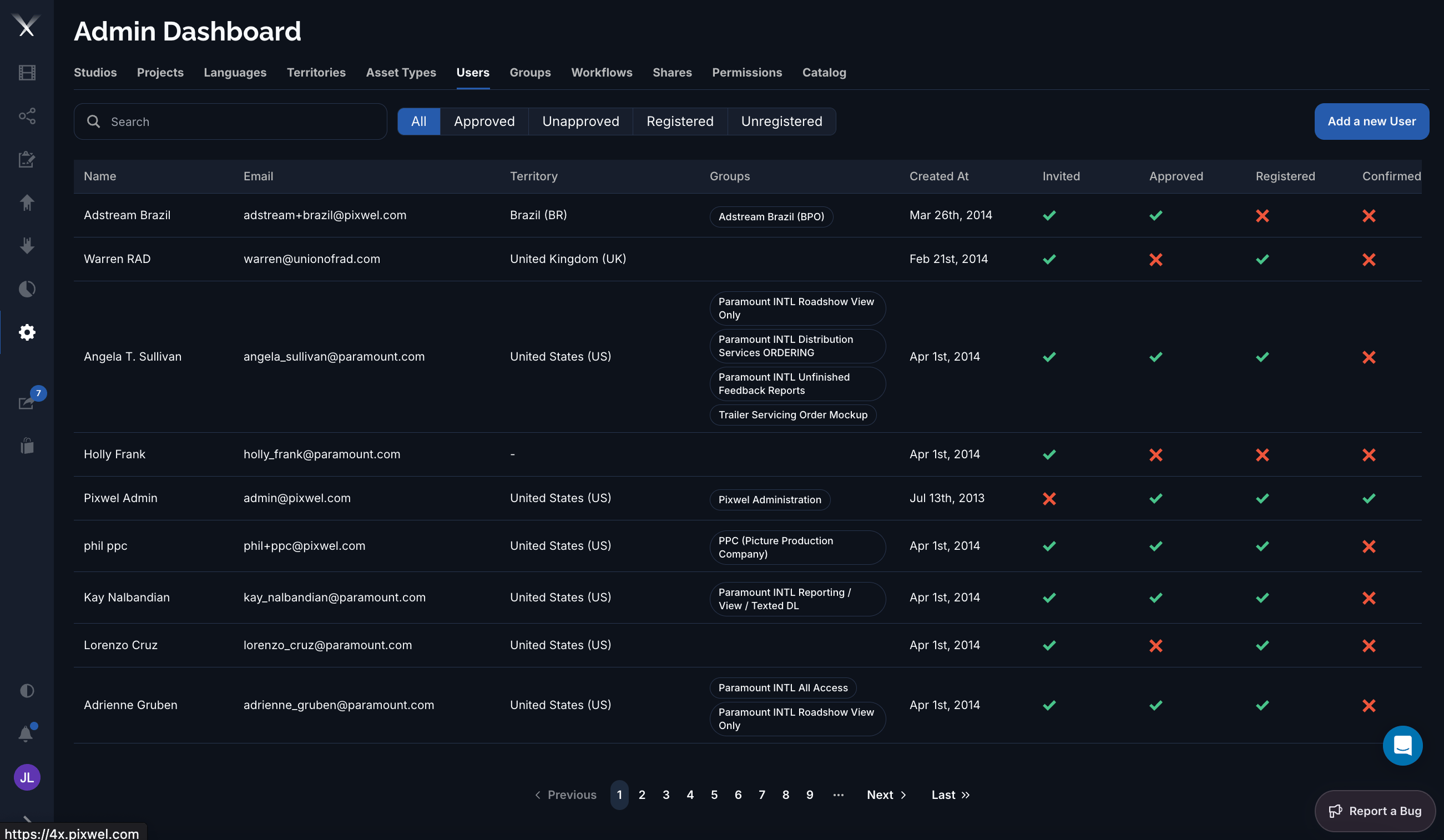
Above the list, filter chips narrow it by lifecycle state: **All**, **Approved**, **Unapproved**, **Registered**, and **Unregistered**. Combine these with **Search** to find an account quickly.
## Columns
| Column | What it is |
| ----------------------------------------------- | --------------------------------------------------------------------------------- |
| **Name** | The user's full name. |
| **Email** | The login email (also the username). |
| **Territory** | The [territory](/features/admin/territories) the user is associated with, if any. |
| **Groups** | The [groups](/features/admin/groups) the user belongs to, shown as tags. |
| **Created At** | When the account was created. |
| **Invited / Approved / Registered / Confirmed** | The account's lifecycle flags (see below). |
| **Actions** | **Impersonate**, **Edit**, **Delete**. |
## Editing a user
The user form has these fields:
* **Full Name**
* **Email** — set at creation and **locked when editing**.
* **Territory** — the user's associated region.
* **Groups** — the groups the user belongs to; this is how membership is granted.
* **Approve** — marks the account as approved.
## Account lifecycle
A standard (**member**) account becomes fully enabled once it is **invited**, **approved**, **registered**, and **confirmed**. A **guest** account — a limited account invited to specific [shares](/features/shares) — is enabled once it is approved. The four status icons in the list let you see at a glance where any account is in that process.
**Impersonate** lets an administrator view the platform as that user — useful for diagnosing access problems. What a user can see and do is governed by their groups and [permissions](/features/admin/permissions), not set directly on the user.
## Filtering
Above the list, filter chips narrow it by lifecycle state: **All**, **Approved**, **Unapproved**, **Registered**, and **Unregistered**. Combine these with **Search** to find an account quickly.
## Columns
| Column | What it is |
| ----------------------------------------------- | --------------------------------------------------------------------------------- |
| **Name** | The user's full name. |
| **Email** | The login email (also the username). |
| **Territory** | The [territory](/features/admin/territories) the user is associated with, if any. |
| **Groups** | The [groups](/features/admin/groups) the user belongs to, shown as tags. |
| **Created At** | When the account was created. |
| **Invited / Approved / Registered / Confirmed** | The account's lifecycle flags (see below). |
| **Actions** | **Impersonate**, **Edit**, **Delete**. |
## Editing a user
The user form has these fields:
* **Full Name**
* **Email** — set at creation and **locked when editing**.
* **Territory** — the user's associated region.
* **Groups** — the groups the user belongs to; this is how membership is granted.
* **Approve** — marks the account as approved.
## Account lifecycle
A standard (**member**) account becomes fully enabled once it is **invited**, **approved**, **registered**, and **confirmed**. A **guest** account — a limited account invited to specific [shares](/features/shares) — is enabled once it is approved. The four status icons in the list let you see at a glance where any account is in that process.
**Impersonate** lets an administrator view the platform as that user — useful for diagnosing access problems. What a user can see and do is governed by their groups and [permissions](/features/admin/permissions), not set directly on the user.