> ## Documentation Index
> Fetch the complete documentation index at: https://help.pixwel.com/llms.txt
> Use this file to discover all available pages before exploring further.
# Notifications
> Control which emails Pixwel sends you and how often — per event type, with the option to mute specific projects or asset types.
The **Notifications** tab in [Preferences](/features/preferences/overview) controls the emails Pixwel sends you. The master **Email Notifications** checkbox turns email on or off for your account — when it's off, every setting below is disabled.
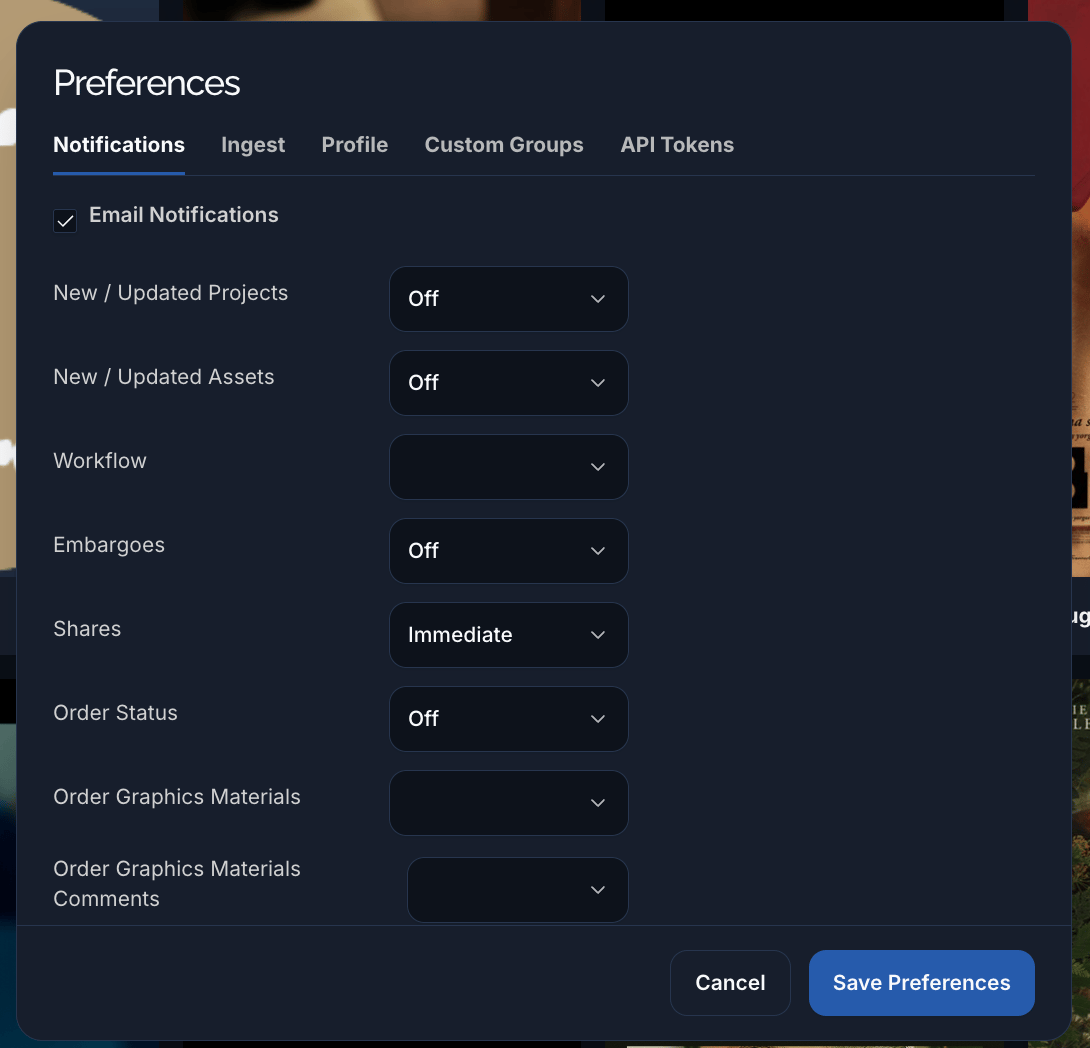 For each kind of event, choose how often you want to be emailed:
| Frequency | What it does |
| ------------- | ----------------------------------- |
| **Immediate** | Email as soon as the event happens. |
| **Hourly** | Batched into an hourly digest. |
| **Daily** | Batched into a daily digest. |
| **Weekly** | Batched into a weekly digest. |
| **Off** | No email for this event type. |
The event types you can set:
| Setting | Emails you when… |
| ------------------------------------- | --------------------------------------------------------------------------- |
| **New / Updated Projects** | A [project](/features/projects/overview) you can see is created or changed. |
| **New / Updated Assets** | An [asset](/glossary) is created or changed. |
| **Workflow** | A [work request](/features/work-requests) changes workflow phase. |
| **Embargoes** | A file's [embargo](/glossary) changes. |
| **Shares** | Something is [shared](/features/shares) with you. |
| **Order Status** | A work request's status changes. |
| **Order Graphics Materials** | Graphics materials are added to an order. |
| **Order Graphics Materials Comments** | Someone comments on order graphics materials. |
| **Order Discussion Comments** | Someone comments in an order's discussion. |
| **Order Preview Comments** | Someone comments on an [offline](/glossary) preview. |
| **Ingest** | An [ingest](/features/ingests) you started finishes. |
| **Others** | Miscellaneous notifications not covered above. |
Below the frequency settings you can **mute specific projects or asset types** — pick them in the "notifications disabled" multi-selects to stop emails for just those, while keeping everything else on.
For each kind of event, choose how often you want to be emailed:
| Frequency | What it does |
| ------------- | ----------------------------------- |
| **Immediate** | Email as soon as the event happens. |
| **Hourly** | Batched into an hourly digest. |
| **Daily** | Batched into a daily digest. |
| **Weekly** | Batched into a weekly digest. |
| **Off** | No email for this event type. |
The event types you can set:
| Setting | Emails you when… |
| ------------------------------------- | --------------------------------------------------------------------------- |
| **New / Updated Projects** | A [project](/features/projects/overview) you can see is created or changed. |
| **New / Updated Assets** | An [asset](/glossary) is created or changed. |
| **Workflow** | A [work request](/features/work-requests) changes workflow phase. |
| **Embargoes** | A file's [embargo](/glossary) changes. |
| **Shares** | Something is [shared](/features/shares) with you. |
| **Order Status** | A work request's status changes. |
| **Order Graphics Materials** | Graphics materials are added to an order. |
| **Order Graphics Materials Comments** | Someone comments on order graphics materials. |
| **Order Discussion Comments** | Someone comments in an order's discussion. |
| **Order Preview Comments** | Someone comments on an [offline](/glossary) preview. |
| **Ingest** | An [ingest](/features/ingests) you started finishes. |
| **Others** | Miscellaneous notifications not covered above. |
Below the frequency settings you can **mute specific projects or asset types** — pick them in the "notifications disabled" multi-selects to stop emails for just those, while keeping everything else on.