> ## Documentation Index
> Fetch the complete documentation index at: https://help.pixwel.com/llms.txt
> Use this file to discover all available pages before exploring further.
# Work Requests
> How you order localized versions of an asset — what a work request contains, the stages it moves through, and who acts at each step.
A **work request** is an order to produce localized versions of an [asset](/features/projects/assets). When a territory needs a trailer subtitled in French, the key art adapted for Japan, or audio dubbed for Germany, that work is captured as a work request and tracked from order to delivery.
## What you're ordering
You build an order on the **Place Order** page. The assets you're ordering for sit in the **Assets List** on the left, the order details fill the center, and a running **Your Order** summary with a live **Cost Estimate** stays on the right.
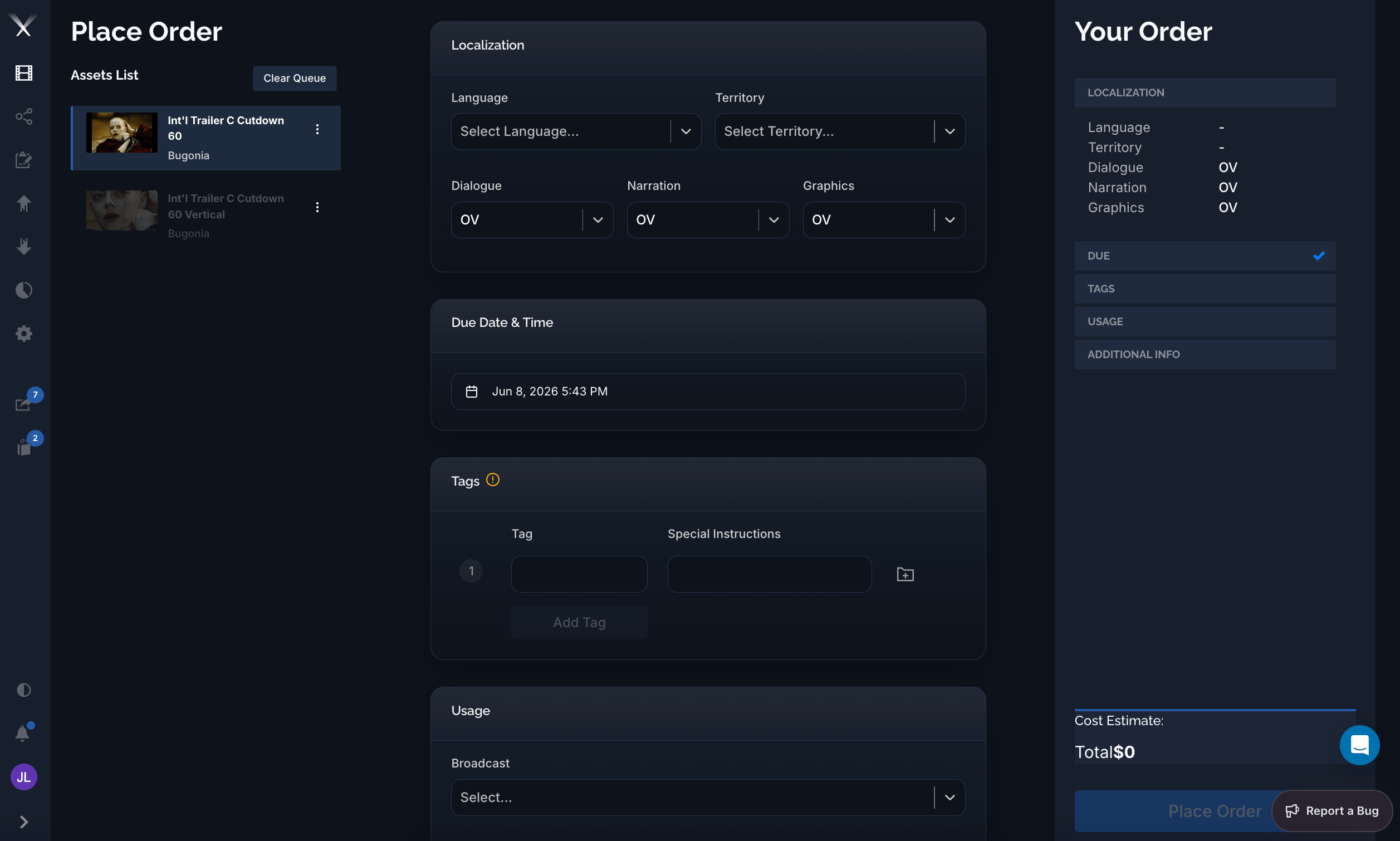 Each work request describes the localization you need:
* **Territory and language** — where the deliverable is going and what language it's in.
* **DNG** — for **dialogue**, **narration**, and **graphics**, whether each stays original (**OV**), gets **subtitled**, or gets a **dedicated** localized version (dubbed audio or localized graphics).
* **Usages** — how the deliverable will be used: online, broadcast, theatrical (DCP), print, and their format variants.
* **Due date, tags, and notes** — when it's needed, how to group the deliverables, and any instructions for the team doing the work.
## The stages of a work request
A work request moves through a defined set of stages. You always know where an order stands by its status.
The order is being drafted. All fields can still be edited; it hasn't been submitted yet.
The order has been sent to Pixwel for processing.
The order is waiting on required source material (for example dubbed audio or graphics) before work can begin.
The team is actively producing the localized assets.
A preview (an *offline*) is ready for the client to review and either approve or send back.
Once approved, the final files are prepared and delivered, and the order is marked complete.
An order can also be **Rejected** (sent back for changes, returning to an earlier stage) or **Cancelled** at most points. The full set of statuses you'll see is: **Incomplete, Submitted, Awaiting Materials, In Progress, For Review, Approved, Rejected, Complete, Cancelled**.
An **offline** is a workprint or preview version sent for approval — not the final deliverable. The final, delivered files arrive when the order reaches **Complete**.
## Tracking an order: the timeline
Open a work request and you get the order's whole life in one view. The left panel holds the order's details — language, territory, the **DNG** choices (here dialogue *Subtitled*, narration *OV*, graphics *Dedicated / Localized*), who requested it, dates, translator, and deliverables — under **Overview**, **Discussion**, **Tags**, and **Files** tabs.
The right side is the **timeline**: every stage the order has passed through, newest at top, each entry stamped with who acted and when. As work progresses you see the delivered files at **Complete**, the approved [tags](/glossary) and deliverables at **Approved**, and the reviewable [offline](/glossary) — with a version selector (`v1`, `v2`, …) and an inline player — at **Awaiting Approval**. Watermarked previews carry the viewer's email.
Each work request describes the localization you need:
* **Territory and language** — where the deliverable is going and what language it's in.
* **DNG** — for **dialogue**, **narration**, and **graphics**, whether each stays original (**OV**), gets **subtitled**, or gets a **dedicated** localized version (dubbed audio or localized graphics).
* **Usages** — how the deliverable will be used: online, broadcast, theatrical (DCP), print, and their format variants.
* **Due date, tags, and notes** — when it's needed, how to group the deliverables, and any instructions for the team doing the work.
## The stages of a work request
A work request moves through a defined set of stages. You always know where an order stands by its status.
The order is being drafted. All fields can still be edited; it hasn't been submitted yet.
The order has been sent to Pixwel for processing.
The order is waiting on required source material (for example dubbed audio or graphics) before work can begin.
The team is actively producing the localized assets.
A preview (an *offline*) is ready for the client to review and either approve or send back.
Once approved, the final files are prepared and delivered, and the order is marked complete.
An order can also be **Rejected** (sent back for changes, returning to an earlier stage) or **Cancelled** at most points. The full set of statuses you'll see is: **Incomplete, Submitted, Awaiting Materials, In Progress, For Review, Approved, Rejected, Complete, Cancelled**.
An **offline** is a workprint or preview version sent for approval — not the final deliverable. The final, delivered files arrive when the order reaches **Complete**.
## Tracking an order: the timeline
Open a work request and you get the order's whole life in one view. The left panel holds the order's details — language, territory, the **DNG** choices (here dialogue *Subtitled*, narration *OV*, graphics *Dedicated / Localized*), who requested it, dates, translator, and deliverables — under **Overview**, **Discussion**, **Tags**, and **Files** tabs.
The right side is the **timeline**: every stage the order has passed through, newest at top, each entry stamped with who acted and when. As work progresses you see the delivered files at **Complete**, the approved [tags](/glossary) and deliverables at **Approved**, and the reviewable [offline](/glossary) — with a version selector (`v1`, `v2`, …) and an inline player — at **Awaiting Approval**. Watermarked previews carry the viewer's email.
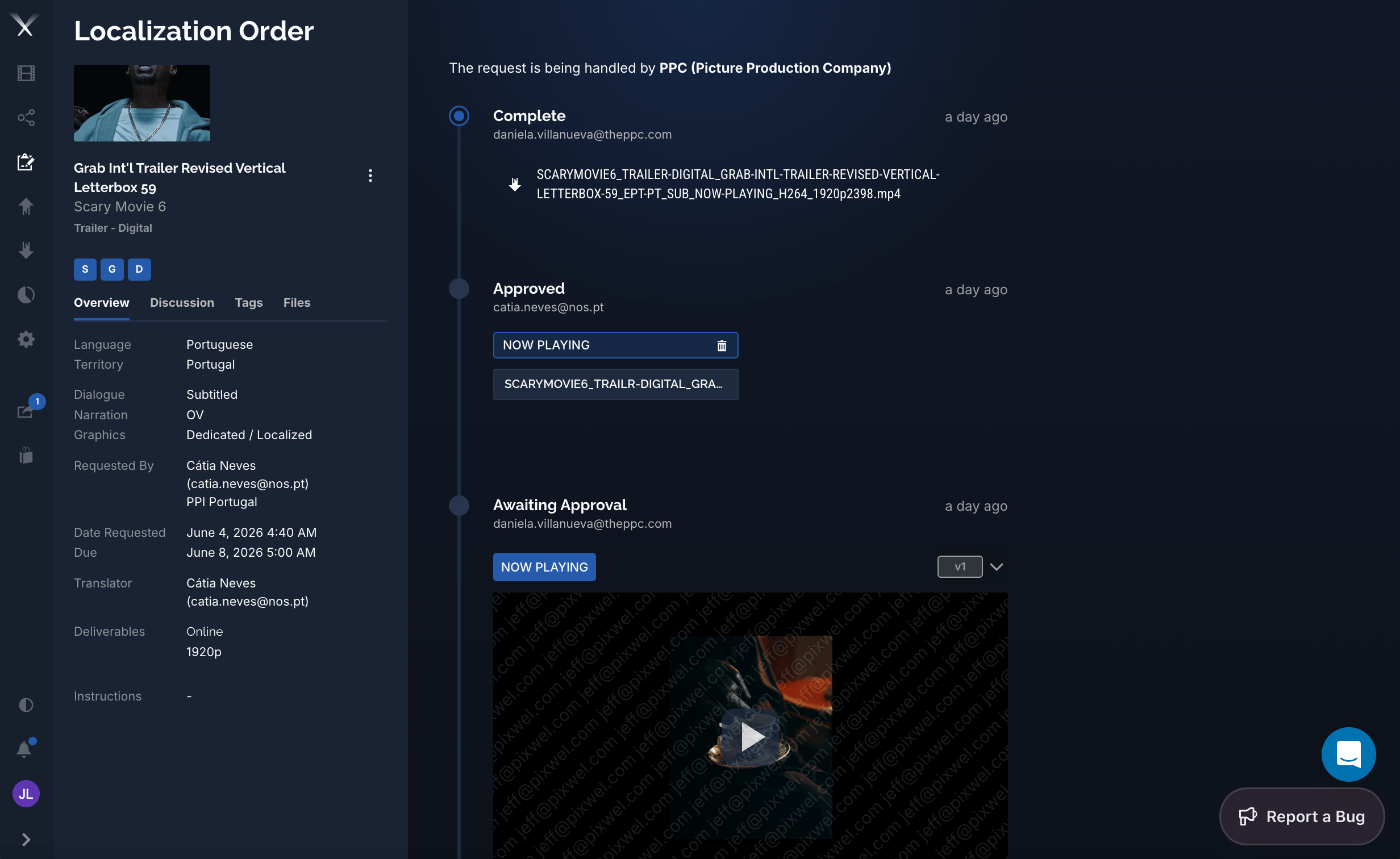 The banner up top shows who's handling the request — the assigned localization [vendor](/features/user-roles#vendor) (for example *PPC — Picture Production Company*).
## Who does what
Within a work request, people act in different [roles](/features/user-roles):
| Role | Does |
| -------------- | ---------------------------------------------------------------------------------------------------------------------------------------- |
| **Owner** | The person (studio or territory user) who created the order. Edits it while incomplete, approves or rejects the preview, and can cancel. |
| **Manager** | Moves the order through its stages — starts work, submits for review. |
| **Vendor** | The localization partner who produces the work and uploads previews and final files. |
| **Translator** | Produces the subtitle or graphics translation for the order. |
| **Admin** | Can perform any action and override transitions. |
## What it produces
As an order progresses it generates translations (the localized subtitles or graphics), then **offlines** for review, and finally the delivered **files** — all attached back to the original asset. The result is a new set of localized versions sitting alongside the source, ready to [share](/features/shares) and [download](/features/downloads).
The banner up top shows who's handling the request — the assigned localization [vendor](/features/user-roles#vendor) (for example *PPC — Picture Production Company*).
## Who does what
Within a work request, people act in different [roles](/features/user-roles):
| Role | Does |
| -------------- | ---------------------------------------------------------------------------------------------------------------------------------------- |
| **Owner** | The person (studio or territory user) who created the order. Edits it while incomplete, approves or rejects the preview, and can cancel. |
| **Manager** | Moves the order through its stages — starts work, submits for review. |
| **Vendor** | The localization partner who produces the work and uploads previews and final files. |
| **Translator** | Produces the subtitle or graphics translation for the order. |
| **Admin** | Can perform any action and override transitions. |
## What it produces
As an order progresses it generates translations (the localized subtitles or graphics), then **offlines** for review, and finally the delivered **files** — all attached back to the original asset. The result is a new set of localized versions sitting alongside the source, ready to [share](/features/shares) and [download](/features/downloads).