> ## Documentation Index
> Fetch the complete documentation index at: https://help.pixwel.com/llms.txt
> Use this file to discover all available pages before exploring further.
# Automated Localization
> On-demand, machine-assisted localization — subtitled (and graphics) or audio deliverables generated in minutes, without a vendor.
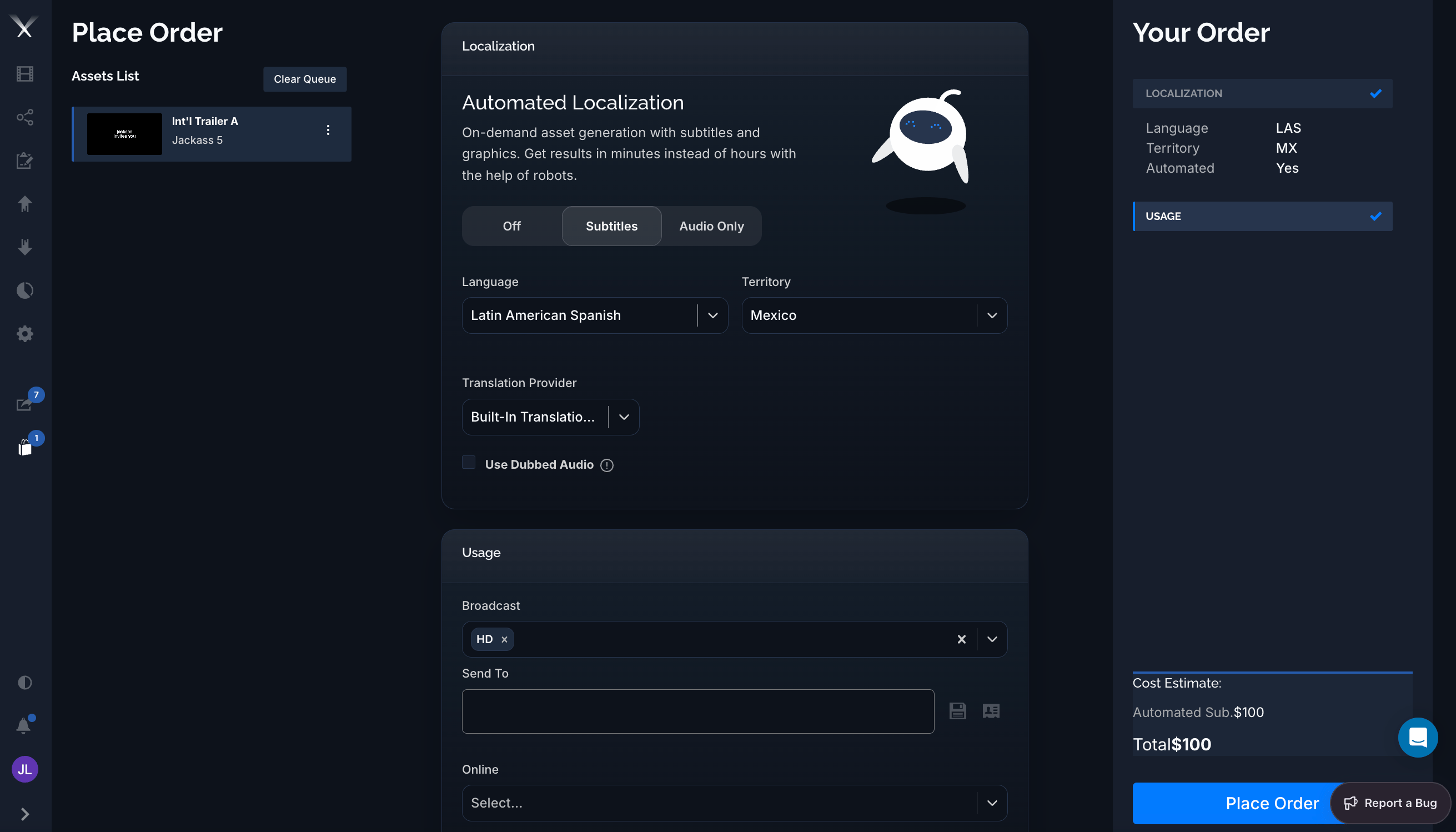
**Automated Localization** generates localized deliverables on demand — with subtitles and graphics, or audio — in **minutes instead of hours**, without routing the order to a [vendor](/glossary). You set it up right on the [Place Order](/guides/placing-orders) page as part of a [work request](/features/work-requests).
 ## When to use it
Reach for Automated Localization when you need a localized version **fast** and the source has the text it needs (a transcription or [script](/features/projects/scripts)). It's ideal for quick subtitled cuts and turnarounds where a full vendor pass would be slower than necessary. For complex creative work — full dubbing, hand-crafted graphics — a standard [vendor work request](/guides/localization-vendors) is still the right call.
## Setting it up
In the **Localization** panel of an order, the Automated Localization toggle offers up to five modes. **Which ones appear depends on what the asset supports** — see [Automated graphics](#automated-graphics) and [Availability](#availability):
| Mode | What you get |
| ------------------------ | ------------------------------------------------------------------------------------------------------------------------------------------------------------------------ |
| **Off** | A standard order — translation and production are handled the normal way. |
| **Graphics** | Automated localized **graphics** only — the asset's on-screen text and graphics are rebuilt in the target language, with dialogue and narration left as [OV](/glossary). |
| **Subtitles** | Automated **subtitled** deliverables (dialogue, narration, and graphics all subtitled). |
| **Subtitles + Graphics** | Both at once — burned-in **subtitles** plus fully localized **graphics** in a single automated deliverable. |
| **Audio Only** | An automated audio deliverable — used with **Use Dubbed Audio** (see below). Availability depends on your account. |
Then choose:
* **Language** — the target [language](/features/admin/languages) (for example *Latin American Spanish*).
* **Territory** — the destination [territory](/features/admin/territories) (for example *Mexico*).
* **Translation Provider** — how the translation is produced:
* **Built-In Translation Tool** — Pixwel's machine translation, applied instantly so the whole order can complete automatically.
* **My Subtitling Vendor** — send the translation to your own subtitling vendor by email instead of using machine translation.
* **Usage** — pick the deliverable formats just like any order (for example **Broadcast** *HD*, **Online**). See [Usage](/glossary).
**Use Dubbed Audio** (Audio Only) lets you upload a dubbed `.wav` to replace the original audio. The uploaded audio **must match the timing of the original version on the platform** — that's what the warning icon is flagging. This option appears only when your account has audio mixing enabled.
## Automated graphics
Automation isn't limited to subtitles — Pixwel can rebuild an asset's **on-screen graphics** (titles, lower-thirds, end cards, and other text) in the target language and burn them into the deliverable. Two modes use it: **Graphics** (graphics only, dialogue left as OV) and **Subtitles + Graphics** (graphics plus subtitles).
In [DNG](/glossary) terms, graphics automation sets the order's **Graphics** to **Dedicated / Localized** — a full localized graphic treatment, not just an overlay — while the subtitled modes set dialogue, narration, and graphics to **Subtitled**.
The **Graphics** and **Subtitles + Graphics** modes only appear when the asset is set up for graphics automation:
* The asset has an **auto-graphics script** — the [Auto Graphics (AutoGfx)](/features/projects/scripts) transcription generated from its graphics project.
* The asset has a **graphics layout file** that defines where each graphic sits, so the localized text can be placed correctly.
* The target **language supports graphics** — automation covers most languages, but a few combined-language codes don't, and the graphics modes are hidden for those.
If those pieces are in place, you can localize the graphics in the same automated, minutes-not-hours pass as the subtitles.
## What it costs
Automated orders are priced **per language**, not per file. The **Your Order** summary marks the order **Automated: Yes** and shows the charge on a line labeled **Automated Sub.** in the [Cost Estimate](/glossary) (for example `$100`). Unlike standard orders, automated orders don't incur per-file encoding charges. Your actual rates come from your studio's billing configuration.
## What you get
When the order runs, Pixwel produces the localized deliverables automatically and delivers them straight to the asset — typically a **Broadcast** (ProRes) and/or **Online** (H.264) version for the usages you selected. Automated output is labeled **`AUTOSUB`** in the file name so you can tell it apart from vendor-produced deliverables. Because there's no vendor queue, results are usually ready in **minutes**, and a due date isn't required.
Automated subtitles build on the same translation foundation as the [subtitler](/guides/subtitling): exact-match lines are reused from translation memory, and machine translation fills the rest — so repeat cuts of the same asset get faster and more consistent over time.
## Availability
Automated Localization appears only when:
* Your group has **autosubs access** for the asset (granted by an administrator on the [Permissions](/features/admin/permissions) tab, and scoped by source, country, and language).
* The asset has a **transcription or script** to translate from (it's not available for print assets).
* For the **Graphics** and **Subtitles + Graphics** modes, the asset also has its auto-graphics setup and the target language supports graphics — see [Automated graphics](#automated-graphics).
* For **Audio Only** and **Use Dubbed Audio**, your account has audio mixing enabled.
If you don't see the option on an asset you expect to, check with your administrator about autosubs access.
## When to use it
Reach for Automated Localization when you need a localized version **fast** and the source has the text it needs (a transcription or [script](/features/projects/scripts)). It's ideal for quick subtitled cuts and turnarounds where a full vendor pass would be slower than necessary. For complex creative work — full dubbing, hand-crafted graphics — a standard [vendor work request](/guides/localization-vendors) is still the right call.
## Setting it up
In the **Localization** panel of an order, the Automated Localization toggle offers up to five modes. **Which ones appear depends on what the asset supports** — see [Automated graphics](#automated-graphics) and [Availability](#availability):
| Mode | What you get |
| ------------------------ | ------------------------------------------------------------------------------------------------------------------------------------------------------------------------ |
| **Off** | A standard order — translation and production are handled the normal way. |
| **Graphics** | Automated localized **graphics** only — the asset's on-screen text and graphics are rebuilt in the target language, with dialogue and narration left as [OV](/glossary). |
| **Subtitles** | Automated **subtitled** deliverables (dialogue, narration, and graphics all subtitled). |
| **Subtitles + Graphics** | Both at once — burned-in **subtitles** plus fully localized **graphics** in a single automated deliverable. |
| **Audio Only** | An automated audio deliverable — used with **Use Dubbed Audio** (see below). Availability depends on your account. |
Then choose:
* **Language** — the target [language](/features/admin/languages) (for example *Latin American Spanish*).
* **Territory** — the destination [territory](/features/admin/territories) (for example *Mexico*).
* **Translation Provider** — how the translation is produced:
* **Built-In Translation Tool** — Pixwel's machine translation, applied instantly so the whole order can complete automatically.
* **My Subtitling Vendor** — send the translation to your own subtitling vendor by email instead of using machine translation.
* **Usage** — pick the deliverable formats just like any order (for example **Broadcast** *HD*, **Online**). See [Usage](/glossary).
**Use Dubbed Audio** (Audio Only) lets you upload a dubbed `.wav` to replace the original audio. The uploaded audio **must match the timing of the original version on the platform** — that's what the warning icon is flagging. This option appears only when your account has audio mixing enabled.
## Automated graphics
Automation isn't limited to subtitles — Pixwel can rebuild an asset's **on-screen graphics** (titles, lower-thirds, end cards, and other text) in the target language and burn them into the deliverable. Two modes use it: **Graphics** (graphics only, dialogue left as OV) and **Subtitles + Graphics** (graphics plus subtitles).
In [DNG](/glossary) terms, graphics automation sets the order's **Graphics** to **Dedicated / Localized** — a full localized graphic treatment, not just an overlay — while the subtitled modes set dialogue, narration, and graphics to **Subtitled**.
The **Graphics** and **Subtitles + Graphics** modes only appear when the asset is set up for graphics automation:
* The asset has an **auto-graphics script** — the [Auto Graphics (AutoGfx)](/features/projects/scripts) transcription generated from its graphics project.
* The asset has a **graphics layout file** that defines where each graphic sits, so the localized text can be placed correctly.
* The target **language supports graphics** — automation covers most languages, but a few combined-language codes don't, and the graphics modes are hidden for those.
If those pieces are in place, you can localize the graphics in the same automated, minutes-not-hours pass as the subtitles.
## What it costs
Automated orders are priced **per language**, not per file. The **Your Order** summary marks the order **Automated: Yes** and shows the charge on a line labeled **Automated Sub.** in the [Cost Estimate](/glossary) (for example `$100`). Unlike standard orders, automated orders don't incur per-file encoding charges. Your actual rates come from your studio's billing configuration.
## What you get
When the order runs, Pixwel produces the localized deliverables automatically and delivers them straight to the asset — typically a **Broadcast** (ProRes) and/or **Online** (H.264) version for the usages you selected. Automated output is labeled **`AUTOSUB`** in the file name so you can tell it apart from vendor-produced deliverables. Because there's no vendor queue, results are usually ready in **minutes**, and a due date isn't required.
Automated subtitles build on the same translation foundation as the [subtitler](/guides/subtitling): exact-match lines are reused from translation memory, and machine translation fills the rest — so repeat cuts of the same asset get faster and more consistent over time.
## Availability
Automated Localization appears only when:
* Your group has **autosubs access** for the asset (granted by an administrator on the [Permissions](/features/admin/permissions) tab, and scoped by source, country, and language).
* The asset has a **transcription or script** to translate from (it's not available for print assets).
* For the **Graphics** and **Subtitles + Graphics** modes, the asset also has its auto-graphics setup and the target language supports graphics — see [Automated graphics](#automated-graphics).
* For **Audio Only** and **Use Dubbed Audio**, your account has audio mixing enabled.
If you don't see the option on an asset you expect to, check with your administrator about autosubs access.