

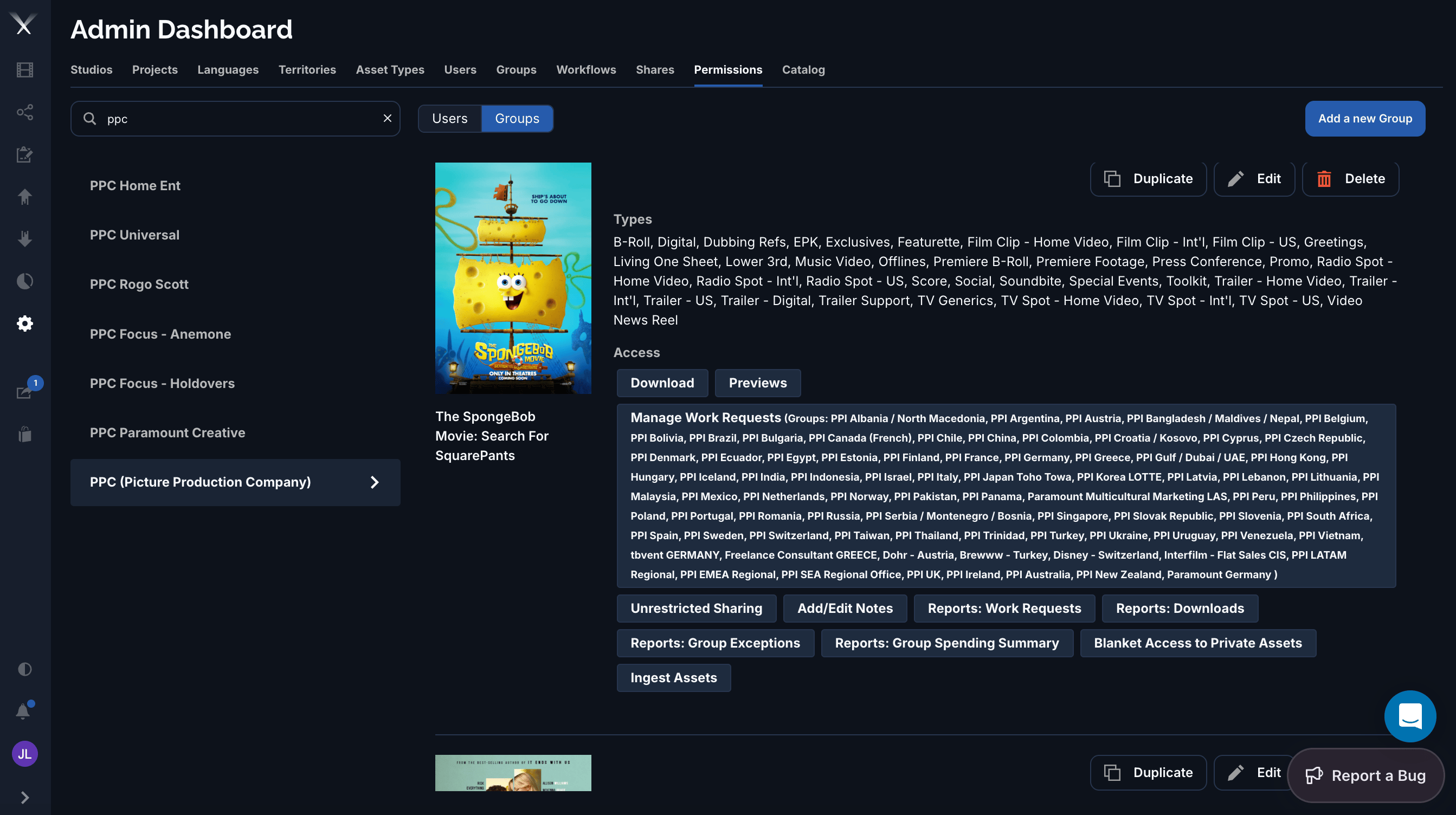
The Permissions tab: a Users/Groups picker and searchable list on the left; the selected group's grants on the right — covered asset types and Access capabilities.
What a permission grant covers
Each grant has three parts: who it’s for, what it applies to, and which capabilities it allows.Scope — what it applies to
Many capabilities can be narrowed further by source — constraining them to specific countries, languages, and localization types (OV, dedicated, subtitled).
Capabilities
Capabilities appear as toggle chips under Access. The labels you’ll see include:- Download and Previews — download files, and view web previews.
- Manage Work Requests — place and manage orders. This one is scoped to specific groups (the grant lists exactly which territory/vendor groups it covers).
- Unrestricted Sharing — re-share without further approval.
- Add/Edit Notes — leave notes on assets and orders.
- Ingest Assets — bring source media into the platform.
- Blanket Access to Private Assets — see assets otherwise locked to specific territories.
- Reports: Work Requests, Reports: Downloads, Reports: Group Exceptions, Reports: Group Spending Summary — access to each report.
A permission grant must be approved to take effect. Grants can also expire, after which they no longer apply.